
Non-Human Identity (NHI) Examples
Non-human identities (NHI) are digital identities assigned to workloads, APIs, service accounts, bots, devices, or AI agents. They bring clear benefits, enabling automation, streamlining service-to-service interactions, and powering scalable infrastructure. However, their scale, dynamic nature, and lack of direct human ownership also make them a growing security risk if not managed properly.
This article will help you understand what NHIs are, how they are created and used, the unique risks they pose, and the tools available to manage them. We’ve included multiple examples to help security practitioners obtain a grounded understanding of the core concepts. Be sure to explore the other chapters of this guide to learn about best practices for managing non-human identities.
Summary of key non-human identity concepts
{{b-list="/inline-cards"}}
Understanding the differences between non-human and human identities
Non-human identities operate silently in the background to enable machines, applications, workflows, and AI agents to interact securely. Understanding how NHIs differ from human identities is critical for designing effective identity governance, detection, and control mechanisms.
Human identities include interactive logins and multi-factor authentication (MFA) tied to a person using services such as Azure AD or Okta. In contrast, non-human identities involve the programmatic creation of roles, tokens, service principals, service accounts, API keys, and certificates, typically used by software code and AI agents.
NHIs are different from human identities in the way they are created, authenticated, and retired. Here are some ways they are different:
- Creation and distribution: NHIs are often created by infrastructure as code (IaC) systems or platforms. For example, Kubernetes auto-creates default service accounts, and GitHub injects GITHUB_TOKEN into workflows.
- Authentication: NHIs use tokens, keys, a security token service (STS), or claims rather than a combination of username, password, and MFA.
- Lifecycle: Many NHIs are ephemeral, like those associated with OpenID Connect (OIDC), an identity layer on top of OAuth 2.0, or STS. Some are long-lived, such as service principal secrets and personal access tokens (PATs).
- Visibility: NHIs are often invisible to manual user reviews and may be embedded in the continuous integration and delivery (CI/CD) of software release processes, infrastructure-as-code (IaC) configuration files, or container images.
How non-human Identities are created and used
In the remainder of this article, we provide examples that demonstrate how NHIs are typically created using infrastructure-as-code (IaC), command-line interfaces (CLI), or utilized in a software delivery pipeline. Here’s a summary:
- Example 1 (AWS Lambda with IAM role): A Lambda function assumes an execution role to read and write to an S3 bucket.
- Example 2 (GitHub Actions workflow identity): A CI job in a GitHub repo that builds and pushes to ECR using an AWS role via OIDC.
- Example 3 (Azure service principal for managed identity): Using a service principal to read secrets by using a system-assigned managed identity.
- Example 4 (Kubernetes service account): Discusses Kubernetes access control configurations across multiple components.
Example 1: AWS Lambda with IAM role
The following example of an AWS CloudFormation template implements NHI by creating an IAM role specifically for Lambda functions. The role utilizes a trust policy that allows only the Lambda service to assume it, and grants precise permissions for logging and S3 bucket access (GetObject from uploads and PutObject to results). Rather than using access keys or credentials, the Lambda function automatically assumes this role at runtime, following the principle of least privilege for service-to-service authentication.
Resources:
  LambdaExecutionRole:
    Type: AWS::IAM::Role
    Properties:
      RoleName: LambdaExecutionRole
      AssumeRolePolicyDocument:
        Version: "2012-10-17"
        Statement:
          - Effect: Allow
            Principal: { Service: [lambda.amazonaws.com] }
            Action: sts:AssumeRole
      Policies:
        - PolicyName: LambdaS3Policy
          PolicyDocument:
            Version: "2012-10-17"
            Statement:
              - Effect: Allow
                Action:
                  - logs:CreateLogGroup
                  - logs:CreateLogStream
                  - logs:PutLogEvents
                Resource: "arn:aws:logs:*:*:*"
              - Effect: Allow
                Action: [s3:GetObject]
                Resource: "arn:aws:s3:::acme-uploads/*"
              - Effect: Allow
                Action: [s3:PutObject]
                Resource: "arn:aws:s3:::acme-results/*"
How Lambda gets NHI credentials at runtime:
- AWS provides temporary STS credentials inside the execution environment (no static secret in code).
- The function uses AWS SDK (e.g., boto3, aws-sdk), which automatically reads these temporary creds.
Example 2: GitHub Actions workflow identity
Let's now look into an example of a GitHub Actions workflow that demonstrates NHI authentication between GitHub and AWS using OIDC. In the following example, GitHub automatically issues a short-lived OIDC token to a job, which is then exchanged with the AWS Security Token Service (STS) to assume the specified IAM role. AWS validates the token’s claims (such as repository, workflow, and ref) against the trust policy before returning temporary credentials that the workflow uses to access AWS services like ECR.
When code is pushed, the workflow authenticates as a trusted identity to AWS, builds a Docker image, and pushes it to ECR, all without requiring the management of static credentials. This approach drastically reduces the security risks associated with traditional credential storage and management.
name: build-and-push
on: [push]
permissions:
  id-token: write
  contents: read

jobs:
  build:
    runs-on: ubuntu-latest
    steps:
      - uses: actions/checkout@v4
      - name: Configure AWS credentials (OIDC)
        uses: aws-actions/configure-aws-credentials@v4
        with:
          role-to-assume: arn:aws:iam::123456789012:role/GitHubActionsRole
          aws-region: us-west-2
      - name: Build & push
        run: |
          docker build -t $REGISTRY/my-app:$GITHUB_SHA .
          aws ecr get-login-password | docker login --username AWS --password-stdin $REGISTRY
          docker push $REGISTRY/my-app:$GITHUB_SHA
Example 3: Azure service principal for managed identity
For Azure, let's first look into a traditional non-NHI approach to create a service principal (like an app identity) with permissions to read secrets from a specific Key Vault. This code returns credentials (appId and secret) that would need to be manually managed (e.g., rotating them before they expire).
az ad sp create-for-rbac --name myWebAppSp --role "Key Vault Secrets User" --scopes /subscriptions/<sub>/resourceGroups/<rg>/providers/Microsoft.KeyVault/vaults/myKeyVault
# returns appId and client secret
With the NHI approach, we first enable a managed identity for the web app (like giving it an automatic, managed ID) and then grant this identity permission to read secrets from the Key Vault:
az webapp identity assign --resource-group rg --name my-webapp
# grant Key Vault access
az keyvault set-policy -n myKeyVault --object-id <principalId> --secret-permissions get list
The first example uses a service principal, which requires manual management of credentials, while the second uses a managed identity, which is automatically managed by Azure, eliminating the need for manual secrets. The NHI approach here is more secure because Azure automatically manages the credentials, while the first approach requires manual credential management.
Example 4: Kubernetes service account
The role-based access control (RBAC) configuration code below sets up a Kubernetes security configuration in the “payments” namespace. It creates a service account (order-sa), defines what it can do through a role (in this case, that it can read config maps and manage orders), and connects them together with a role binding. This ensures that the service account has only the specific permissions it needs and nothing more, following the principle of least privilege. The RBAC manifest below has three “kind” sections: ServiceAccount, Role, and RoleBinding.
apiVersion: v1
kind: ServiceAccount
metadata:
  name: order-sa
  namespace: payments
---
apiVersion: rbac.authorization.k8s.io/v1
kind: Role
metadata:
  namespace: payments
  name: order-role
rules:
- apiGroups: [""]
  resources: ["configmaps"]
  verbs: ["get", "list"]
- apiGroups: ["example.com"]
  resources: ["orders"]
  verbs: ["create", "update"]
---
apiVersion: rbac.authorization.k8s.io/v1
kind: RoleBinding
metadata:
  name: order-binding
  namespace: payments
subjects:
- kind: ServiceAccount
  name: order-sa
  namespace: payments
roleRef:
  kind: Role
  name: order-role
  apiGroup: rbac.authorization.k8s.io
{{b-table="/inline-cards"}}
Understanding the risks and challenges unique to non-human Identities
This section takes a deeper look into the examples discussed above and explains how they could be abused conceptually, what indicators developers and security teams should look for, and defensive remediation steps to mitigate the potential risks.
The high-level principle is that because NHIs lack human controls (e.g., no MFA and no phishing training), an attacker who gains code/CI access, a compromised pod, or leaked tokens can act immediately.
Example 1: AWS Lambda with IAM role
When a Lambda environment is compromised or its environment variables are leaked, an attacker can gain access to embedded credentials or sensitive configuration data. Using these exposed credentials, the attacker can assume the Lambda’s execution role and leverage its permissions to read or modify S3 objects, invoke other AWS APIs, or perform additional actions within the authorized scope of that role.
Ensuring security
Consider the following approaches:
- Narrow role policies (no *:*); update IaC and redeploy.
- Move secrets from env vars into Secrets Manager and grant the role access only to the specific secret ARN, like this:
aws secretsmanager get-resource-policy --secret-id my/secret - Add IAM policy conditions, for example:
"Condition": {"StringEquals": {"aws:SourceAccount": "123456789012"}} - Enable S3 server access logging, and use Athena queries to monitor for large data exfiltration events. Beyond logging alone, it’s crucial to understand the expected usage patterns of systems that rely on NHIs. Monitoring should correlate the NHI’s activity, such as frequency, data volume, and access context, with the permissions it holds to underlying systems.
- Use GuardDuty or other threat detection alerts for anomalous access patterns.
- Use CloudWatch Logs Insights to look for spikes in invocation count or runtime errors.
Security governance and monitoring
Effective governance begins with regularly reviewing all IAM roles and their attached policies to ensure that they follow the principle of least privilege, granting only the permissions necessary for their intended function. Continuous monitoring through CloudTrail events or CloudWatch Logs Insights helps identify unusual activity, such as sudden spikes in function invocations or unexpected runtime errors. Additionally, integrating services like GuardDuty or other threat detection tools can provide automated alerts for anomalous access patterns, enabling faster detection and response to potential security incidents.
Frequently used commands
The following commands help security practitioners inspect and monitor NHIs and their activities in AWS. The first two commands retrieve IAM role details and attached inline policies to verify granted permissions, while the third command queries CloudTrail logs for specific events (like GetObject) to detect and investigate access patterns or potential misuse.
# Check role and attached inline policy
aws iam get-role --role-name LambdaExecutionRole
aws iam get-role-policy --role-name LambdaExecutionRole --policy-name LambdaS3Policy

# List CloudTrail events for S3 GetObject (sample)
aws cloudtrail lookup-events --lookup-attributes AttributeKey=EventName,AttributeValue=GetObject
Example 2: GitHub Actions workflow identity
If attackers can push workflow changes (e.g., via compromised maintainer or supply-chain action), they can execute code within the workflow and (if misconfigured) assume an AWS role via OIDC or use a leaked PAT.
To ensure security
Take these actions to enhance security:
- Restrict who can create or modify workflows by requiring code owner reviews and branch protections. For example, you can update the AWS trust policy for the OIDC role to restrict to repo and optionally by environment:
"Condition": {
  "StringLike": {
    "token.actions.githubusercontent.com:sub": "repo:myorg/myrepo:*"
  },
  "StringEquals": {
    "token.actions.githubusercontent.com:aud": "sts.amazonaws.com"
  }
}
- Use OIDC with a strict role trust condition, e.g., token.actions.githubusercontent.com:sub = repo:myorg/myrepo:environment:production for production roles.
- Avoid long-lived PATs. Rotate and remove PATs; use GITHUB_TOKEN/OIDC instead.
Security governance and monitoring
To investigate and secure GitHub-to-AWS integrations, start by reviewing AWS CloudTrail for AssumeRoleWithWebIdentity events that indicate OIDC-based role assumptions. In GitHub, examine workflow run logs and organization audit logs to track authentication activity and verify who has permission to modify workflows through branch protection and review requirements. If any static access tokens were previously used, revoke them and migrate to OIDC or the built-in GITHUB_TOKEN, and use GitHub Secret Scanning to identify and remediate any leaked personal access tokens (PATs).
Frequently used commands
In AWS, the CloudTrail query helps identify AssumeRoleWithWebIdentity events, which indicate OIDC-based role assumptions by automated workflows. In GitHub, reviewing the organization’s audit log (either through the UI or API) helps track workflow changes and detect any unauthorized modifications to CI/CD pipelines.
# AWS: check OIDC AssumeRole events
aws cloudtrail lookup-events --lookup-attributes AttributeKey=EventName,AttributeValue=AssumeRoleWithWebIdentity

# GitHub: review organization audit log via UI or API for workflow changes
Example 3: Azure Service Principal for Managed Identity
A leaked client secret for a service principal gives an attacker authentication to Azure AD as that application, allowing access per assigned RBAC roles (no MFA).
To ensure security
It’s better to use managed identities to eliminate static client secrets.
If SPs are required, store secrets in Key Vault and set tight access policies and periodic rotation. Use conditional access or named locations to restrict where SPs can be used, and use PIM to control elevated roles.
Security governance and monitoring
In Azure, begin by querying active service principals to identify all existing app registrations and their associated IDs within Azure Active Directory. Review the roles and permissions assigned to each principal to ensure appropriate access levels, and continuously monitor Key Vault diagnostic logs to track secret access patterns and detect any signs of unauthorized or suspicious activity.
Frequently used commands
In the following, the first two commands list service principals and their associated role assignments, allowing you to verify which applications have access to specific Azure resources. The final command retrieves diagnostic settings for Azure Key Vault to confirm that access logging is enabled, ensuring visibility into secret access and potential security anomalies.
# List service principals and assignments
az ad sp list --filter "displayName eq 'myWebAppSp'" --query '[].{appId:appId,displayName:displayName}'
# List role assignments for the app
az role assignment list --assignee <service-principal-appid>

# Check Key Vault access logging (if diagnostics enabled)
az monitor diagnostic-settings list --resource /subscriptions/<sub>/resourceGroups/<rg>/providers/Microsoft.KeyVault/vaults/myKeyVault
Example 4: Kubernetes service account
Compromise of a pod leads to exfiltration of the mounted service account token; the token is then used to call the API server with the service account’s RBAC scope.
To ensure security
Do the following to minimize the chance of security problems:
- Disable automount globally and opt-in per pod. Set automountServiceAccountToken: false.
- Use bound service account tokens (projected tokens, short-lived) instead of static secrets.
- Reduce privileges by replacing ClusterRoleBindings with namespace-scoped roles or role bindings.
- Use admission policies (Gatekeeper) to deny privileged containers and restrict host path mounts.
Security governance and monitoring
Check for Kubernetes audit logs showing system:serviceaccount: principals performing unexpected create or patch operations, or RoleBinding and ClusterRoleBinding creations. Also check the Runtime alerts (Falco) for suspicious reads of /var/run/secrets/kubernetes.io/serviceaccount/token.
Frequently used commands
The first command in the following checks what specific actions a service account is authorized to perform, while the second command searches all RoleBindings and ClusterRoleBindings to identify where that service account is granted access across the cluster.
# Check what the service account can do
kubectl auth can-i --as=system:serviceaccount:payments:order-sa create pods -n payments

# Find RoleBindings referencing service accounts
kubectl get rolebinding,clusterrolebinding --all-namespaces -o yaml | grep -B3 "system:serviceaccount:payments:order-sa"
{{b-watch="/inline-cards"}}
Integrating specialized non-human identity tooling
Auditing and inspecting NHIs is both critically important and notoriously tedious. Modern organizations easily accumulate thousands of machine identities across AWS, Azure, GitHub, Kubernetes, CI/CD systems, AI agents, and internal automation frameworks. Each platform exposes its own APIs, credential types, and event formats, which makes it extremely difficult to manually track which roles, tokens, or service accounts exist, what permissions they have, and when they were last used. Manually reviewing these identities through individual consoles or CLI commands is error-prone, time-consuming, and difficult to scale.
Automated NHI auditing tools can continuously inventory and analyze all identities—human and non-human—across clouds and development pipelines. They correlate data from IAM, CI/CD systems, and runtime telemetry to detect anomalies such as:
- Overprivileged roles (e.g., a Lambda role with wildcard S3 access)
- Dormant or unused tokens (e.g., a GitHub Personal Access Token (PAT) that hasn’t been used in 90 days)
- Static secrets or credentials embedded in source code
- Service accounts with excessive RBAC permissions in Kubernetes
- Abnormal behavior patterns (e.g., an Azure service principal used from a new geographic region)
Without automation, these issues surface only after an incident.
A well-designed NHI security system should provide the following capabilities.
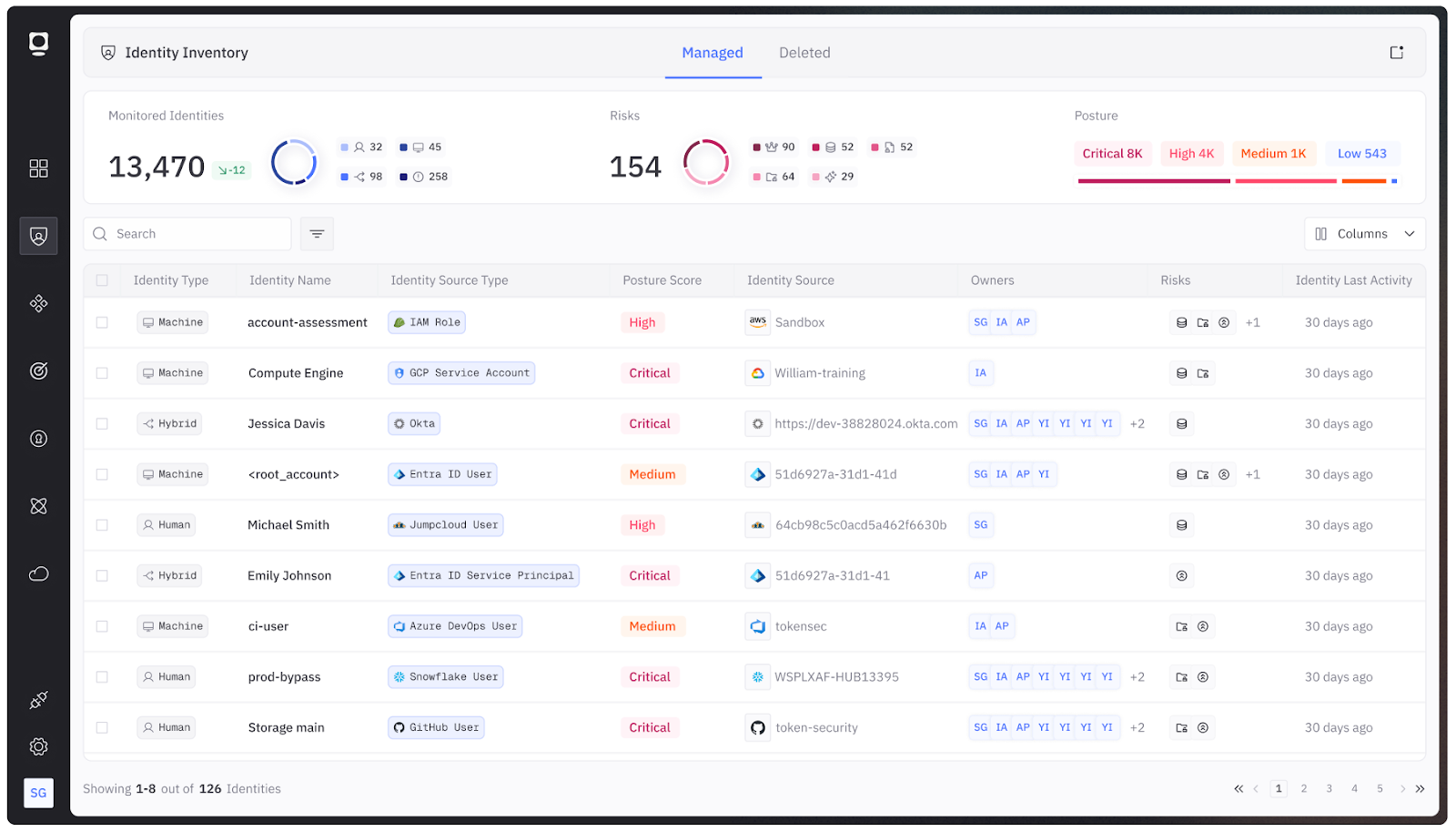
Comprehensive discovery
Comprehensive discovery is critical because organizations cannot secure what they cannot see. Maintaining a complete inventory of all NHIs across environments enables security teams to gain the visibility needed to detect unmanaged identities and eliminate shadow access.
Start by enumerating all NHIs across multiple clouds, CI/CD platforms, and clusters. Then classify them by type (role, token, service account, certificate) and environment.
Continuous permissions analysis
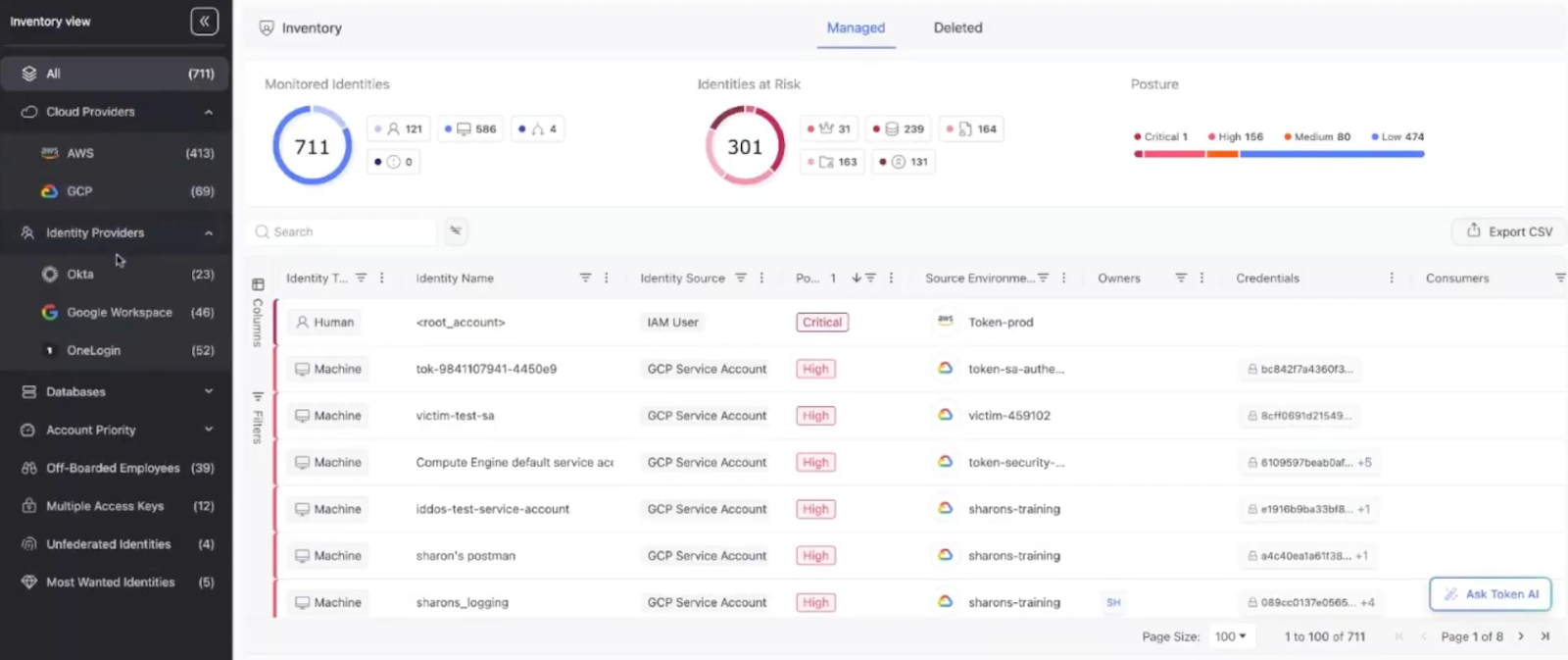
Continuous permissions analysis is essential to ensure that NHIs operate strictly within their intended boundaries. During the analysis, map effective privileges (e.g., policy evaluation and RBAC graph traversal). Such technology helps automatically analyze and flag excessive or risky permissions without the need for manual reviews.
Usage and activity correlation
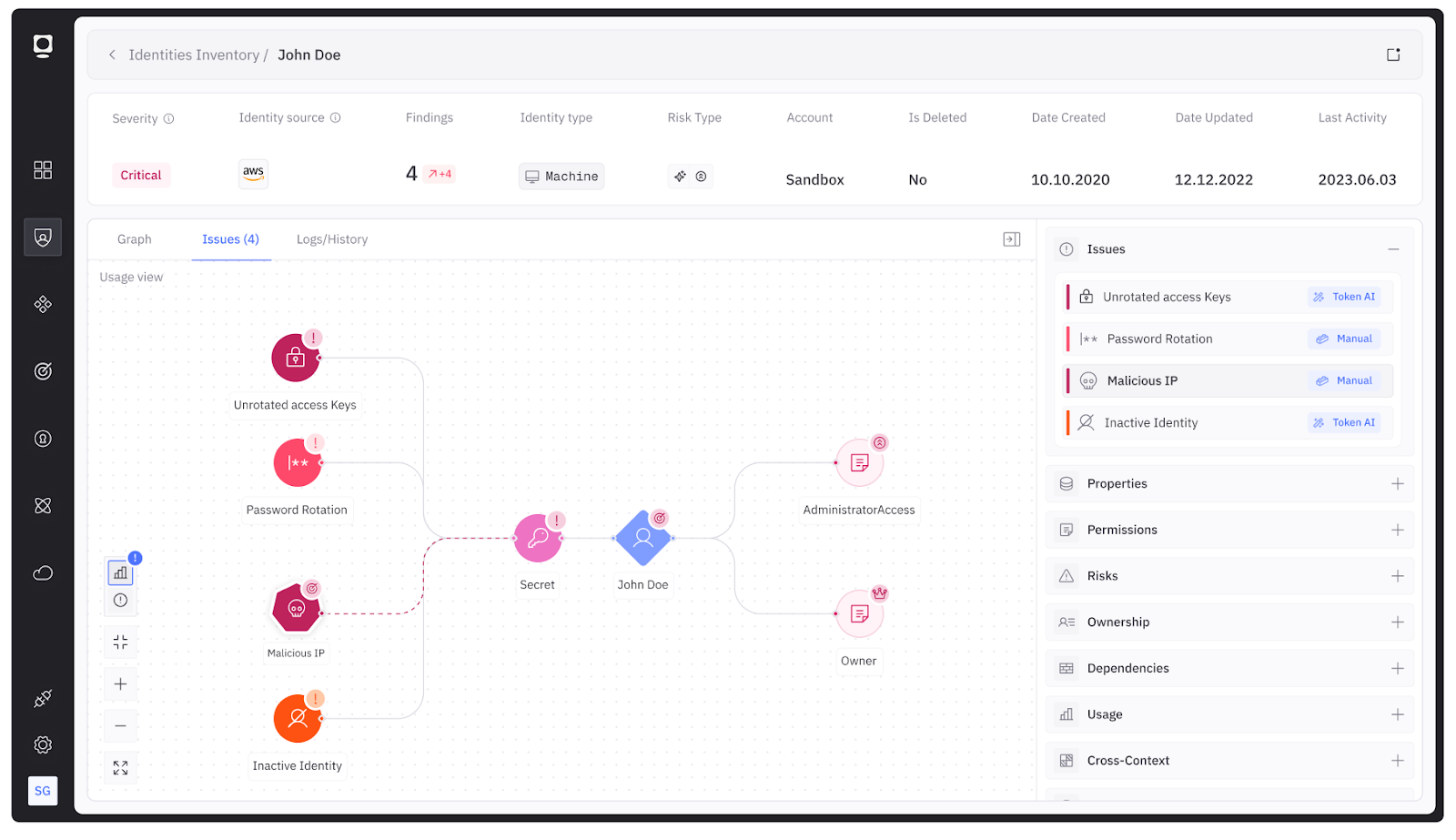
Usage and activity correlation is vital for distinguishing normal machine behavior from potential compromise. Connecting audit logs and telemetry across platforms lets organizations quickly identify inactive or anomalous NHIs.
To do this, integrate with audit logs and events from a diverse source of NHI providers (e.g., CloudTrail events, Azure Activity Logs, GitHub audit events, etc.). Highlight inactive identities or anomalous call patterns.
Policy enforcement and remediation hooks
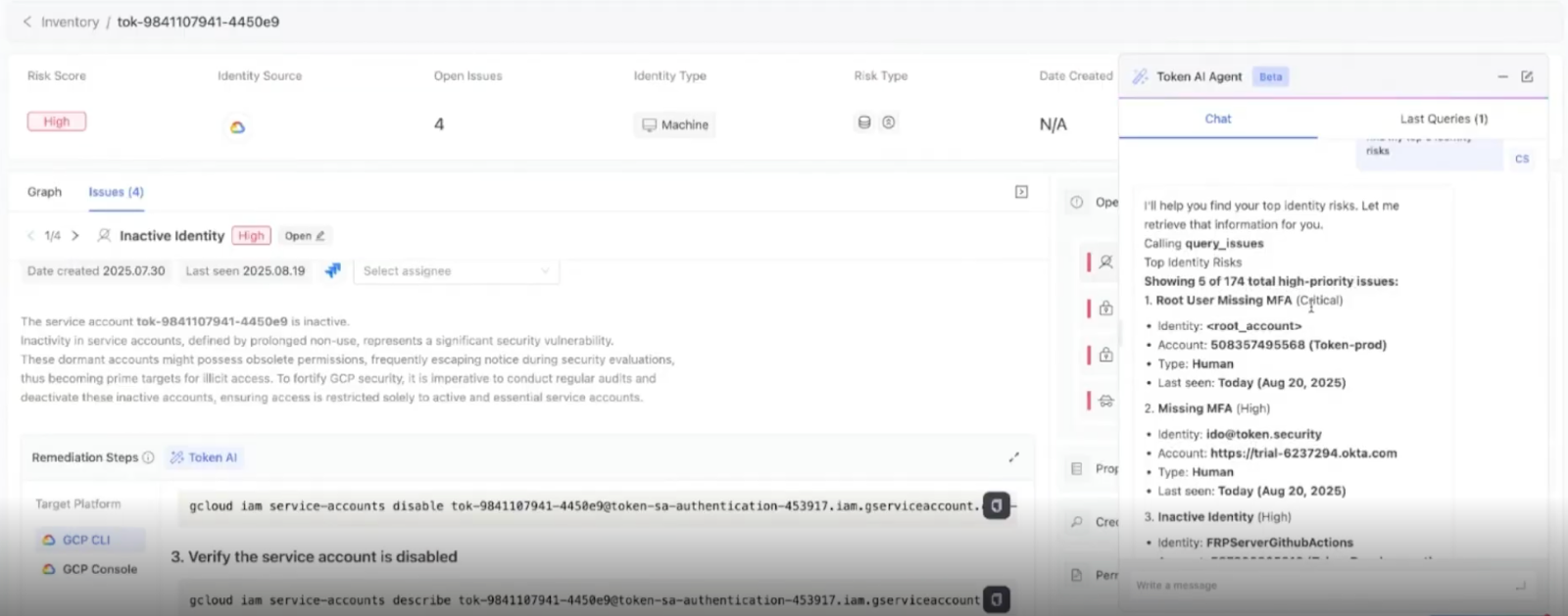
Policy enforcement and remediation hooks ensure that NHI risks are addressed proactively rather than reactively. Organizations can combine agentic AI–driven privilege analysis with automated remediation and IaC integration to continuously enforce least-privilege access, eliminate stale credentials, and correct misconfigurations at their source.
Leverage agentic AI systems to continuously analyze the behavior and access patterns of NHIs, automatically identifying excessive permissions and suggesting refined, least-privilege configurations. These AI agents can learn from real-time activity, adapt to evolving workloads, and proactively recommend or even implement access adjustments to minimize security risk without disrupting functionality.
Automatically revoke or rotate credentials that are unused or compromised. Support integration with IaC pipelines to fix misconfigurations at the source.
Visualization and reporting
Visualization and reporting turn complex NHI data into actionable insight. Clear dashboards and exportable reports enable security and compliance teams to track trends and validate least-privilege adherence.
For the best success, provide dashboards of active vs. dormant NHIs, privilege distributions, and compliance posture. Offer exportable reports for compliance frameworks.
{{b-img="/inline-cards"}}
Conclusion
Manual inspection cannot keep pace with the volume and velocity of non-human identities. Effective NHI security requires automated tooling that continuously audits, classifies, and remediates risks before they can be abused. Integrating these systems into development and operational pipelines improves visibility and transforms identity management into a proactive, measurable security discipline.