
From a ChatGPT Slip to Full GitHub Access: The Attack Path No One Detects



From a ChatGPT Slip to Full GitHub Access: The Attack Path No One Detects
A GitHub personal access token (PAT) sat forgotten in an old ChatGPT conversation for months, but still fully valid. With two low impact API calls, it revealed admin access to production repositories across multiple organizations. An attacker could have mapped that access, cloned protected repos, and walked away without generating a single entry in the audit logs most teams rely on.
This post walks through exactly how this scenario plays out, what shows up in GitHub's audit logs at each step, and where the gaps are.
A Secret Hiding in Chat History
At Token Security, we help customers find exposed secrets across the real places where work happens, such as code, logs, internal tools, and AI chats. In this case, we discovered the PAT while scanning an organization’s ChatGPT history using OpenAI’s Compliance API.
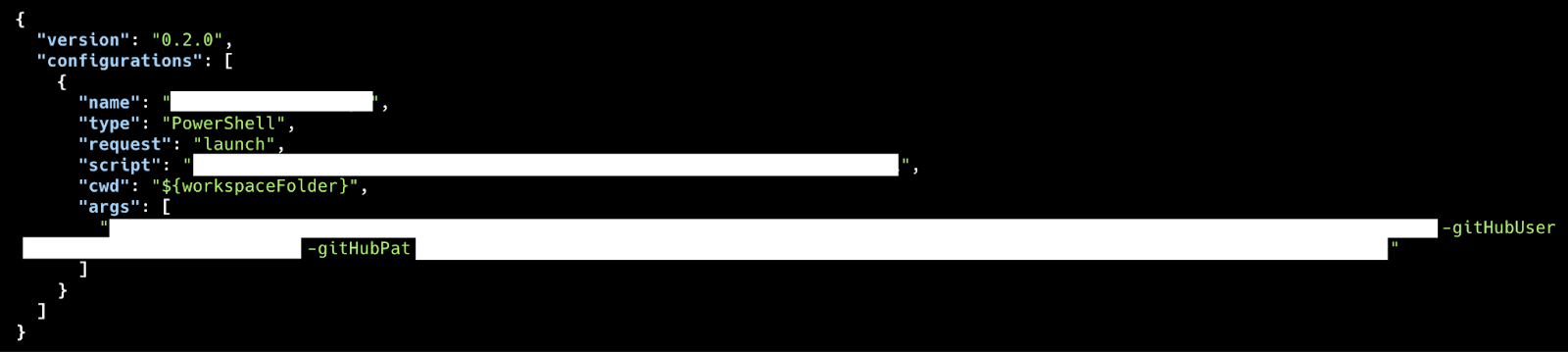
In one conversation, someone had pasted a code snippet into a chat and accidentally included their personal GitHub classic PAT. The message was still sitting in conversation history, months later.
Two API Calls. A Complete Access Picture.
We had a username from the snippet and we had the token string itself. But, we didn’t yet have the answer to the questions that mattered the most in the first minutes of a real incident:
- Is the token still valid?
- Which GitHub user does it actually authenticate as?
- What organizations and repositories does that identity have access to, and with what permissions?
We validated it with two GitHub REST API calls:
- GET /user to confirm the token is valid and to identify the exact GitHub user it authenticates as.
- GET /user/repos to list repositories the authenticated user can access, including permissions (read, write, admin) per repo.
That’s it. No write actions, no active operations, no modifications. Just identity confirmation and permission mapping, exactly the kind of reconnaissance an attacker would do first, because it’s fast and nearly invisible.
What We Found
The token was still valid. It belonged to a user with admin permissions across multiple GitHub organizations, including production repositories containing sensitive code and infrastructure.
This is the part people often underestimate: a PAT doesn’t have “its own” privileges. It inherits whatever access its owner already has. Developers frequently have broad access across orgs and environments, so a token that leaked in a casual chat can turn into production reach very quickly.
The Visibility Gap: Reconnaissance That Leaves No Trace
After confirming the impact, we asked the defensive question: if an attacker had found this same token and ran those same two calls, would anyone notice?
We looked for evidence of those API calls in two setups:
- A standard GitHub organization on a Free/Team plan (using the organization audit log).
- GitHub Enterprise Cloud with audit log streaming configured, and API Request Events explicitly enabled.
For context: in GitHub Enterprise Cloud, audit log streaming exports audit events to external systems (Splunk, Datadog, Amazon S3, etc.). And there’s even a dedicated feature called API Request Events, an opt-in setting intended to log API activity for investigations. API Request Events is not enabled by default. You have to explicitly turn it on.
Here’s what surprised us:
The GET /user and GET /user/repos calls did not appear in the audit log. They were not in the Free/Team organization audit log, and not in GitHub Enterprise Cloud audit log streaming, even with API Request Events enabled. We found that GitHub only logs calls against private and internal repositories, not user-level endpoints.
Practically that means that an attacker can take a leaked PAT, confirm the owner, and map effective access across repos and orgs. This can all be done without producing any audit signal many teams rely on for early detection.
It Gets Worse: Even Cloning Can Slip Through
Once reconnaissance is done, the next obvious step is cloning repositories. You’d expect that activity to be loud and show up clearly. In practice, that assumption often breaks down too.
GitHub explicitly documents that git.clone events are not available in the audit log web interface. You only get them via the REST API, audit log streaming, or specific exports.

Why this matters:
- If you’re only checking the audit log web UI, you will miss cloning activity entirely.
- Git events typically have shorter retention than many other audit events (GitHub notes a seven-day retention window for Git events in their documentation).
- If you’re not exporting or streaming audit logs, you may not have what you need when you finally go looking.
Even when you do capture git.clone, it can look deceptively normal. A PAT authenticates as the token’s owner, so GitHub records the legitimate user as the actor. The event includes useful context like repository, transport protocol, country code, and a user agent.
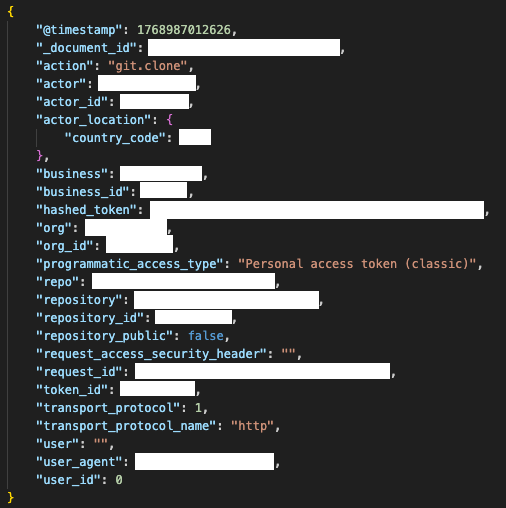
But, none of that proves the real person behind the keyboard. A careful attacker can also reduce obvious anomalies by matching a common developer user agent, routing through a VPN in the expected region, and operating during normal working hours, which makes the event blend in completely.
The One Setting That Changes the Equation
There is one concrete step that meaningfully improves detection: enabling source IP disclosure in your GitHub audit log settings.
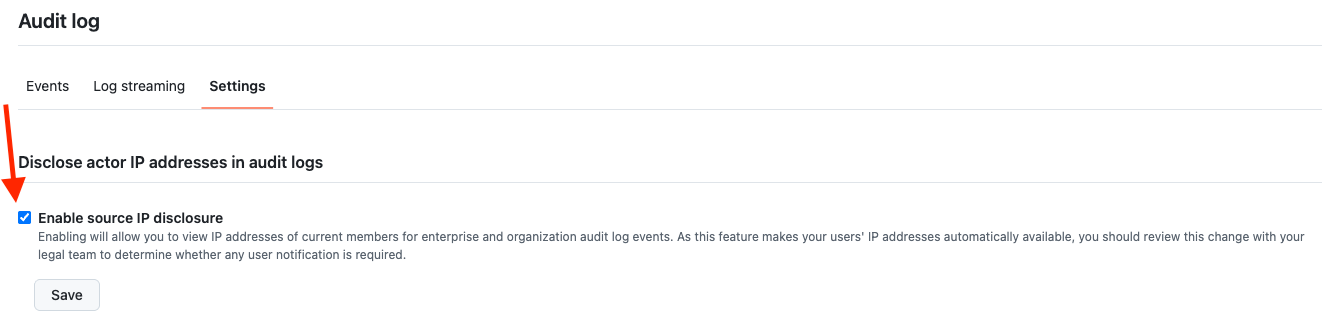
GitHub doesn’t show source IPs in audit logs by default. You have to explicitly turn it on in your audit log settings.
With IPs present, the highest-signal patterns get much clearer: a git.clone from an IP outside known corporate/VPN ranges paired with unusual location or user agent, off-hours access, or abnormal volume (many repos cloned in a short window).
Without source IPs, you’re relying on behavioral signals that a moderately careful attacker can easily fake. With them, you have something much harder to spoof.
Check Your Exposure Now
If you want to check your own exposure and detection coverage, start here:
- Do you export or stream audit logs somewhere you can search later?
- Are Git events included in what you export or stream?
- Is source IP disclosure enabled? (Settings → Audit log → Settings tab → Enable source IP disclosure)
- Do you scan internal AI tools and chat platforms for secrets?
If any of those are “no” or “not sure,” you have the same blind spots this incident surfaced in my description above.
Speed Is the Only Control That Matters
A leaked PAT isn’t just a leaked string. It’s a capability.
And, because reconnaissance can be fast and quiet, the defensive advantage comes down to one thing: how quickly you can detect the leak and rotate the credential before it’s used.
In theory, the response sequence is straightforward: detect the leak, identify the owner, confirm the token is still valid, understand the access it grants, and rotate it immediately. In reality, each of those steps is harder than it sounds, especially when secrets surface in places like months-old AI conversations, across tools, and identities that are all over the place.
What Can Token Security Do About This
Token Security helps customers catch secrets that slip into the tools teams use every day, including internal ChatGPT conversations that are easy to forget about over time.
When we find something, we focus on making remediation practical:
- Ownership: tie the secret to the identity behind it, so you know who needs to act.
- Validity: check whether it’s still usable (not just present).
- Access: show what the credential can actually reach, including cross-functional exposure across organizations.
That context makes rotation actionable, so the right person rotates the right secret quickly, and teams understand the true blast radius, not just the location where the token happened to appear.
To learn more about how Token Security can help address scenarios like this, request a demo today.
Secure Every AI Agent.
From Creation to Runtime.