
AI Agents: Day 60 Looks Nothing Like Day One





With personal agents on the rise, two things matter the most: how quickly they’re propagating across organizations and what their impact is. Token Security’s data shows not only the rapid pace of agentic adoption, often without necessary oversight, but also significant increases in agent access over time. To understand the impact further, we partnered with NanoCo, drawing on its expertise deploying secure agents into large enterprises, to shape the questions behind our research and explore how organizations can actually adopt personal agents safely.
A personal AI assistant on its first day within the enterprise is very different from what it looks like on day 60. Agents do mutate, evolve, and adapt. Privileges are often added, but rarely removed, making agent risk follow a continuously upward trajectory.
Even when considered separately, agentic adoption and evolution are sufficient to necessitate a rethinking of enterprise security. Together, they’re a stick of dynamite: extremely dangerous, yet with incredible use cases that we need to accelerate, not hold back.
Assistants arrive before anyone signs off
By late October, 52% of the companies we monitor had a personal AI assistant on a work computer or connected to a company account, including OpenClaw and Hermes. While the previous generation of AI assistants grew slowly over months, new ones are adopted far more rapidly. Meta’s Muse, for example, was at one in four of the companies we monitor just 6 weeks after launch. Of those installs, 35% could run command-line tools.
The trailblazers in that area were the coding agents and desktop AI apps, which are still climbing. Over nine weeks, installs per work computer rose:

To see the trend’s true shape, we looked at our customers over a six-month period. AI agents grew 86% while human identities grew 8%.
Very little of this requires IT approvals at a typical organization. An assistant can be an app or an OAuth grant. Apps that have shell access can do whatever the user can, but grants aren’t much safer.
With one Google approval, Instinct gets seven access types: it can read and change mail, change mail settings, open every Drive file, edit documents, edit the calendar, and read contacts.
The next-closest assistant we track asks for four access types. And at 33% of the companies whose Microsoft 365 permissions we could assess, at least one AI agent held company-wide read access that works without any user signing in.
This is the opposite of least privilege access. It's standard practice for employees, yet it's largely non-existent for agents. Meanwhile, leading frontier AI labs and agent developers are heading the other way, toward all-purpose agents that can touch everything. That may make agents more capable, but it also means a single agent can become a single point of failure.
Agent privilege creep is real
Agents are rarely satisfied with their initial access. On average, we saw the number of tools configured per agent increase by 129% over 60 days. In fact, the most sensitive tools are often added after day 1.
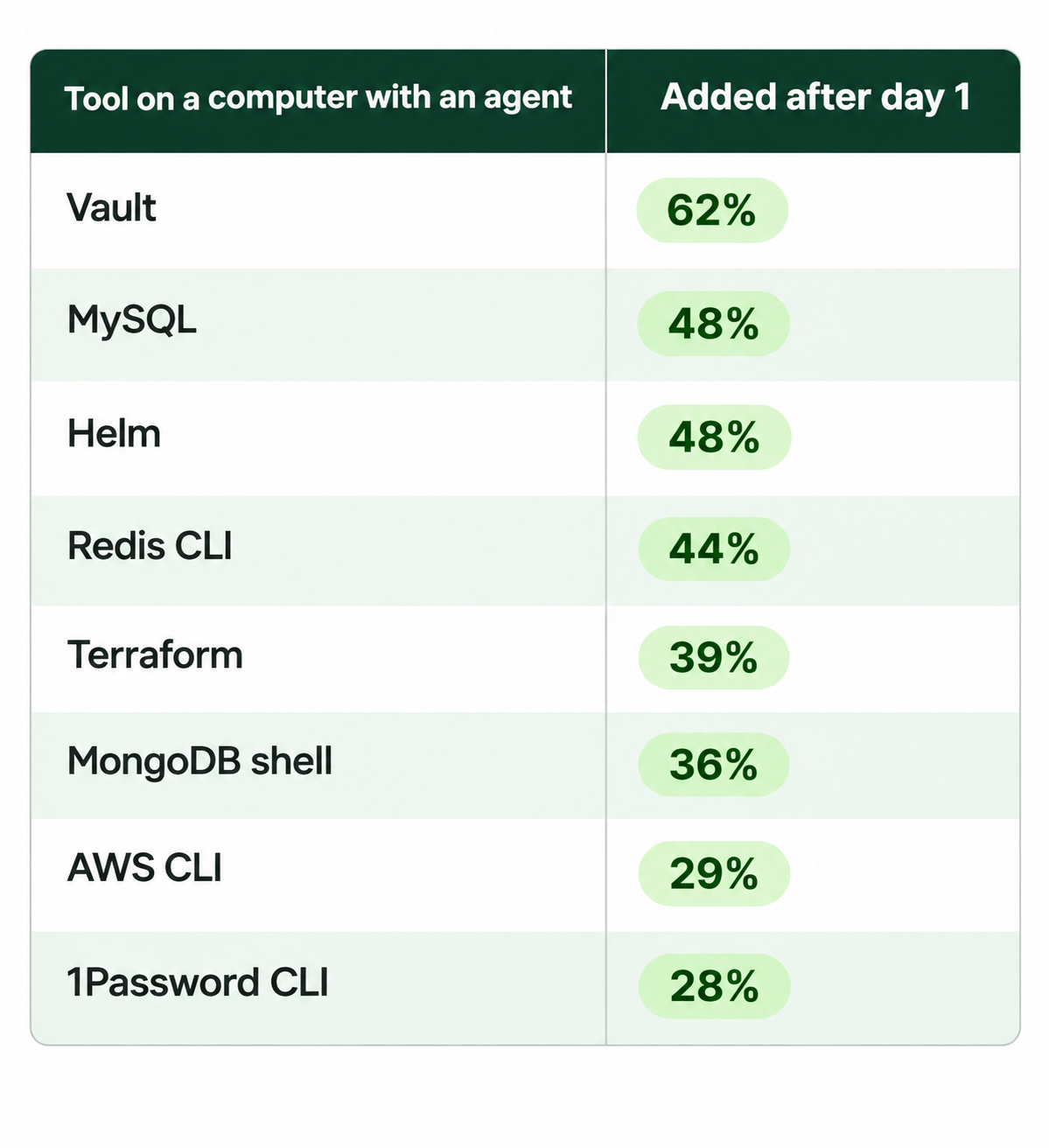
In fact, the privilege creep never stops. We compared the same Claude users eight weeks apart. On average, the share of people whose agents ran sensitive tools rose from 38% to 67%, and each person's agents made 2.8 times as many tool calls.
NanoCo sees the same pattern in its deployments. Most agents are connected to email or calendar from day one, and that's actually some of the most sensitive data a person has. Access only snowballs from there, and there’s an important distinction to make: it’s not always the person reaching for more, often, it's the agent, persistently asking for it.
Shortcuts make it worse
Some of that reach comes from habits nobody signed off on either:
- 20.8% of agents connecting to company systems through MCP use a key written into a config file. Any software that reads the file can copy it and reuse the person's company access.
- At 86% of companies with such keys, at least one opened a database, a cloud account, or production logs.
- About 1 in 12 Claude Code agents with sensitive tools started in bypass mode, which skips routine permission checks. Among agents without sensitive tools, fewer than 1 in 100 did.
Trust, but Verify
When employees can't connect their agents to company systems, they work around it. They copy and paste records, and upload files to web portals, with no oversight over where that data ends up.
Direct access flips that. Instead of an employee exporting 10,000 rows of customer data to build a single dashboard, an agent can run a query and pull only what it needs. Less data moves, and every action is visible and auditable. The key is being intentional: access granted through policies set across the organization, not piled on one request at a time.
At this point, banning assistants would either push them further out of sight or provoke open dissent. They’re too popular, and their advantages are too apparent. Like elsewhere, here too, light is the best disinfectant.
Ideally, you know which assistants your people run, what each one connected on day one, and what it has picked up since. Most importantly, you know whether the access matches the intent. Then, you can set limits and make sure agents don’t overreach while still being helpful. The best way to do this is by using identity as the control plane.
Secure Every AI Agent.
From Creation to Runtime.